Disclosure: the order buttons on this page carry our Starlink referral link. Order through one as a new US customer and Starlink rewards you and this site’s owner alike.Disclosure: order buttons carry our referral link, and an order through one earns us a reward.How we earn →
How to order Starlink in the US, one checkout step at a time
A Starlink order happens on starlink.com in one browser session: type the service address, choose between Residential and Roam plans, settle the kit, read the order summary, then pay. The five steps below follow that path with screenshots captured Oct 30, 2026, and show where the $100 referral credit fits in if you qualify.
Referral fit checkSeven taps against Starlink’s rulesToday
Address, plan, kitOn starlink.com, in one tabToday
Order summaryGreen “Referral Code Applied” panelCheckout
First invoiceActivation day or a week after deliveryMonth 1
$100 credit, if eligibleTerms: 2nd monthly invoiceInvoice 2
Rules taken from the Oct 7, 2026[T] edition of Starlink’s US referral terms, plus its terms of service and help center
The checklists and tools run in your browser and send nothing
Independent publisher; the order buttons carry our referral link
The walkthrough
How do you order Starlink in the US?
Short answer, checked Nov 3, 2026: you place the order on starlink.com, where you type your US service address, choose a Residential plan for a home or a Roam plan for travel, purchase the kit (or rent one where offered), review the one-time and monthly charges, and pay. Service billing then starts at activation, or seven days past delivery, or 30 days from shipping if no delivery date exists, whichever is earliest. The five steps below follow that order.
1 A few minutes
Have these ready before opening starlink.com
Aim to go from the address box to payment in one sitting. Having gone through starlink.com’s page code ourselves on Oct 21, 2026, we found that one tab’s session storage holds the referral, and closing the tab wipes itour reading[S]; Starlink’s own pages say nothing of the kind, so plan to pay in that same tab. Tick the list as you go; nothing is saved.
Seven one-tap questions, each tied to one of Starlink’s rules. If the answer is no, you find out before ordering rather than two invoices later, and the rest of the walkthrough still works without the $100.
0 / 7
Referral link: this button opens starlink.com with this site owner’s referral attached. New to Starlink, using a US service address and buying the kit and plan on that site? Then Starlink states that $100 reaches you after two months subscribed, while the owner here earns a matching $100. Store and reseller kits are left out. How to Order Starlink stands apart from SpaceX and Starlink as an independently run publisher. How we earn
Pay in the tab this opens: studying the site’s code (Oct 21, 2026), we saw the referral live in that tab alone, and Starlink’s terms never mention it. Before paying, make sure a green panel reading “Referral Code Applied” sits by Checkout.
3 On starlink.com
Open starlink.com, type your address and pick a plan and kit
Click once you’re set to buy: the link loads starlink.com in a fresh tab. Type the service address, choose the plan and the kit, and stay in that tab all the way to payment.
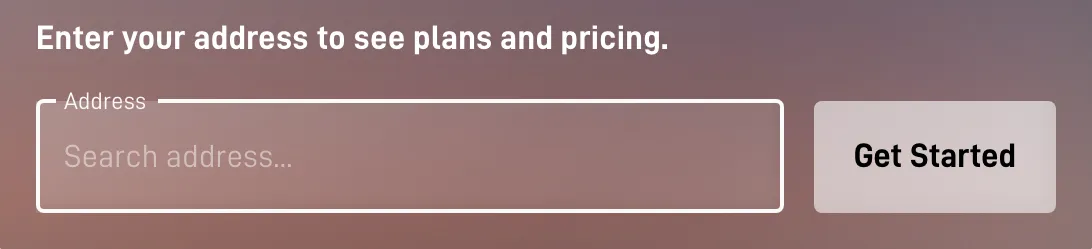
Screen 1: the address box. starlink.com as captured Oct 30, 2026; prices shift with address and plan.
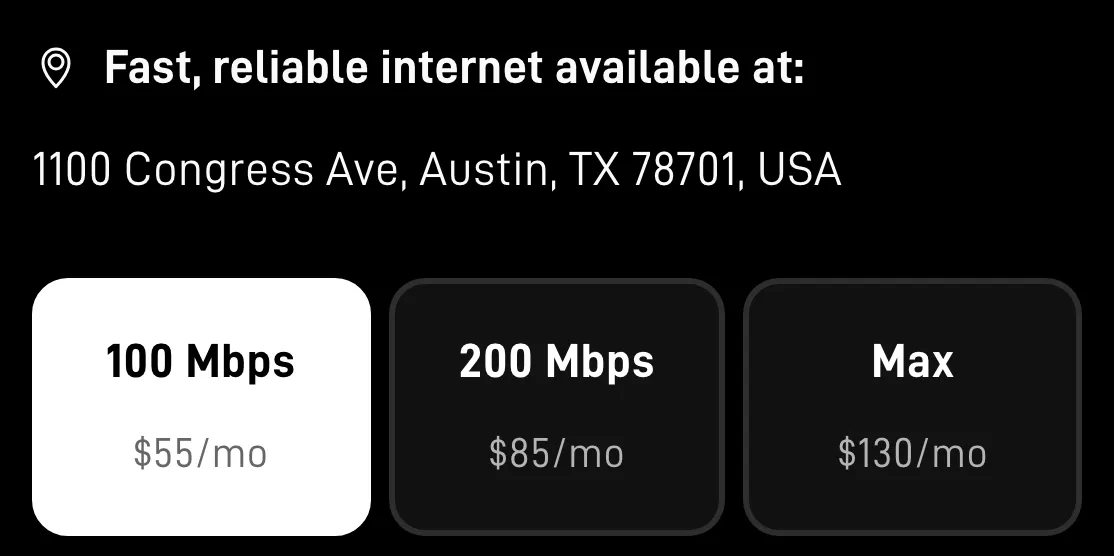
Screen 2: plan cards priced for that address. starlink.com as captured Oct 30, 2026; prices shift with address and plan.
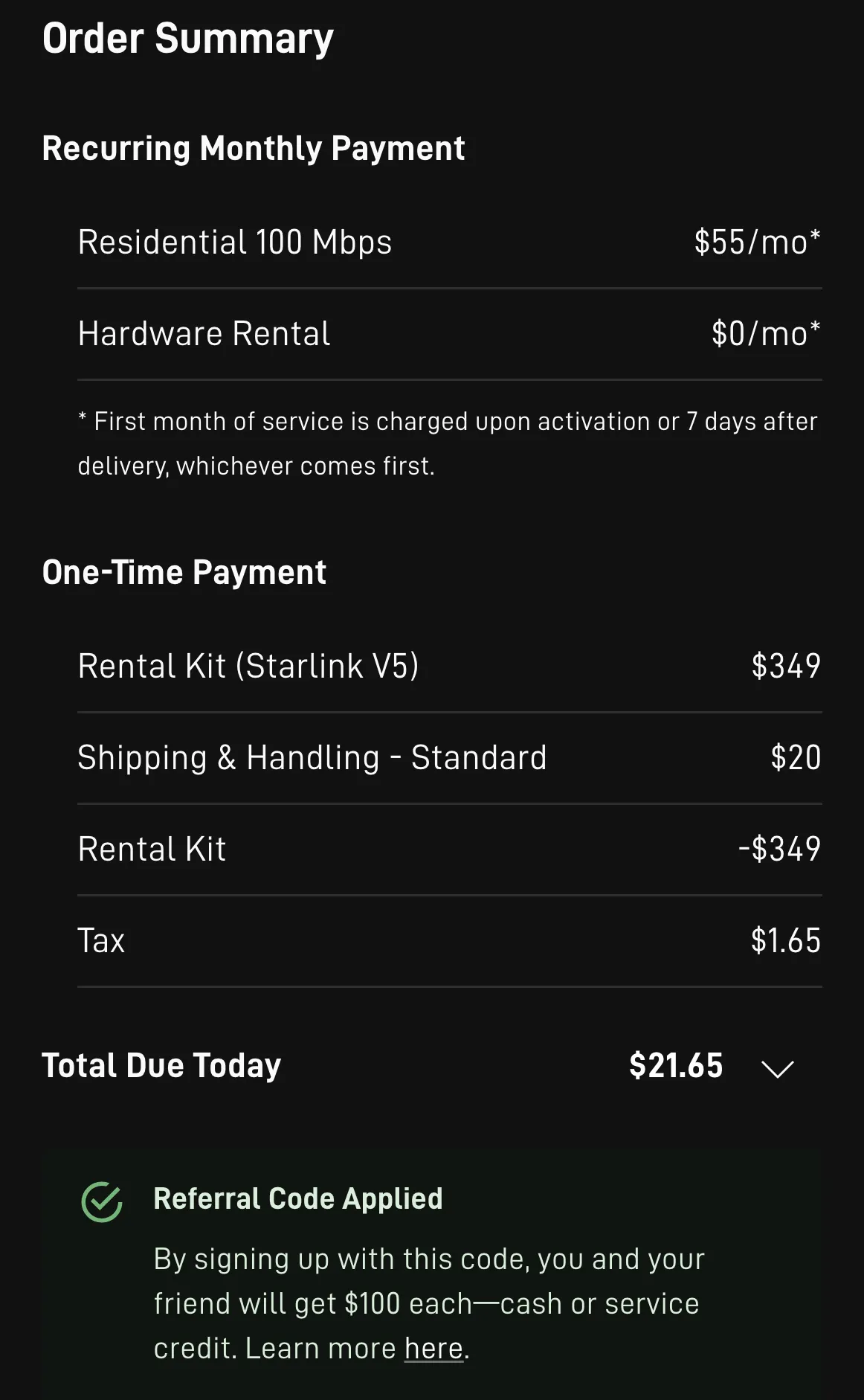
Screen 3: the summary, before Checkout. starlink.com as captured Oct 30, 2026; prices shift with address and plan.
Referral link: this button opens starlink.com with this site owner’s referral attached. New to Starlink, using a US service address and buying the kit and plan on that site? Then Starlink states that $100 reaches you after two months subscribed, while the owner here earns a matching $100. Store and reseller kits are left out. How to Order Starlink stands apart from SpaceX and Starlink as an independently run publisher. How we earn
Pay in the tab this opens: studying the site’s code (Oct 21, 2026), we saw the referral live in that tab alone, and Starlink’s terms never mention it. Before paying, make sure a green panel reading “Referral Code Applied” sits by Checkout.
Read the order summary and find “Referral Code Applied”
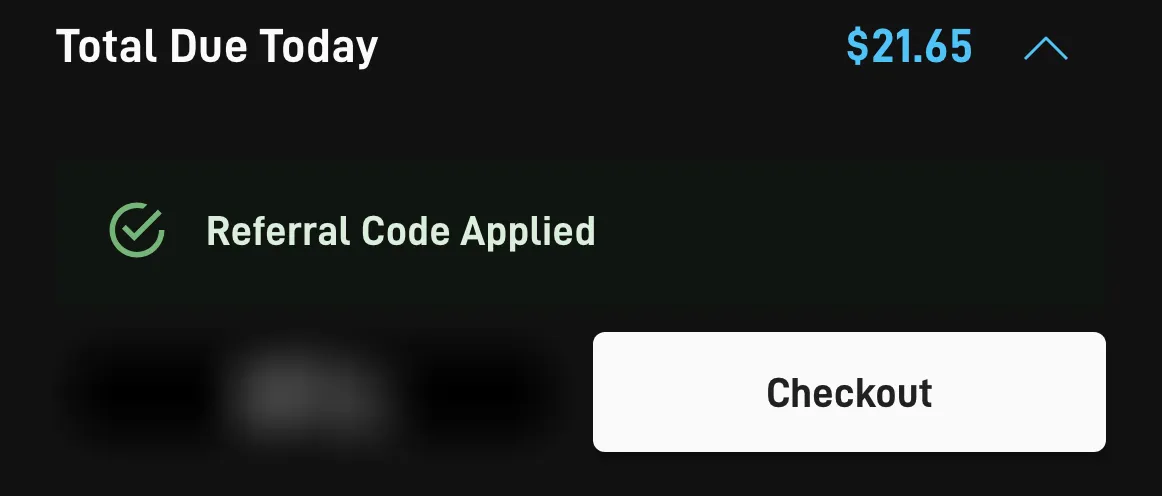
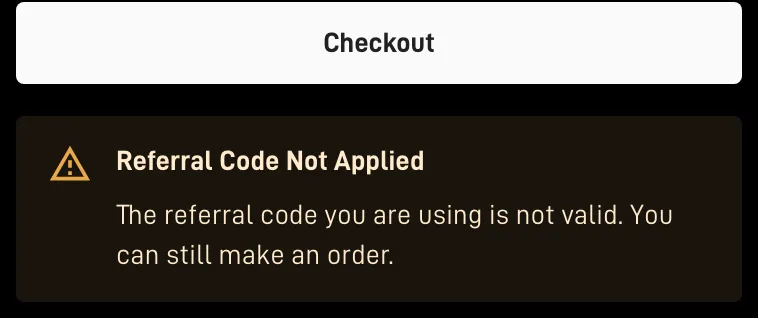
The summary splits monthly service from one-time charges such as the kit, shipping, tax and any surcharge. By the Checkout button (underneath on a computer, directly over it on a phone), a green panel confirms the referral. An amber panel saying “Referral Code Not Applied”, or no panel at all, means stop and don’t pay yet.
✓ Go ahead
Referral attached: carry on. starlink.com as captured Oct 30, 2026; prices shift with address and plan.
✕ Stop
Not attached: sort it out first. starlink.com as captured Oct 30, 2026; prices shift with address and plan.
No green panel?
Return here, click the referral link again in the same browser, and redo the address and plan in the tab it opens.
Skip signing in to an old Starlink account: anyone who has held a Starlink account before, current or past, is excluded[H].
Don’t pay now and plan a fix later: a referral missing at the time of the order can’t be attached later[H].
The order day covers the kit and one-time charges; billing for service starts on whichever comes first: activation day, one week after delivery, or 30 days from shipping when no delivery date is on record[ToS]. Starlink’s terms say the $100 is placed on the second monthly invoice for your subscription[T], while its help center calls it possible from day 60 after activation at the earliest, subject to account settings and an identity check[H]. Enter a date to lay out your invoices.
What do you pay when you order Starlink, and what comes later?
The national US order list Starlink showed us on Nov 3, 2026 (no address typed) listed Residential service from $49.50 a month and a Standard kit at $349 to buy[S], and your address can price differently. Checkout takes the kit (or a rental’s activation fee), shipping, tax and, in busy areas, a demand surcharge, while the first month of service bills later. A referral credit, if you qualify, arrives on a later invoice and never lowers the checkout total.
Due at checkout
Buying the hardware costs $349 for a Standard kit or $149 for a Mini; where an address is offered a rental instead, the one-time activation fee on that list was $0, $99 or $199[S]. Busy coverage areas can add a one-time demand surcharge, which shows up in the order summary[H].
Nothing off up front
The first month is billed in full and the kit is activated as normal, with no referral amount taken off the checkout total[H].
Where the credit goes
Credit can only go toward monthly subscription charges, up to the size of the charge: against a $120 invoice, $100 of credit leaves $20 due[H]. It comes as service credit on your Starlink account unless you pick otherwise[T], or as a bank payout through Stripe where Starlink offers cash, switched on in the Referrals tab of your starlink.com account[H].
Who decides
SpaceX has the final say on whether a referral qualifies and may withhold, delay or take back a reward[T]. Starlink may alter or close the program on 30 days’ notice, and referrals already pending during that notice stay under the earlier terms[T].
What else do buyers ask before ordering?
Can I switch to the Starlink app after opening the link?
Use a web browser for the whole order. By our reading of the order site’s code (Oct 21, 2026), that one tab’s session storage holds the referral, and closing the tab wipes it, and we found nothing that hands it to the app.
My kit came from a store. Can the referral be added now?
No. Starlink says the reward attaches to sign-ups made on starlink.com, not to retail or reseller kits or transferred accounts, and a referral missing at the time of the order can’t be attached later.
The tab closed before I paid. What now?
Treat the referral as lost: nothing we found keeps it outside that tab. Click the referral link again, redo the address and plan in the new tab, and confirm “Referral Code Applied” shows by Checkout before paying.
Who else earns something when I order through your link?
This site’s owner, because both sides of a referral receive an equal reward. That reward pays for the site, and it’s why every order button says so. How we earn.
Markers: [T] referral terms, [ToS] terms of service, [H] help center, [S] starlink.com pages or code.
Step 3, when you’re set
Start the order on starlink.com, then pay in that same tab
Type your US service address, choose a plan and a kit, and wait for “Referral Code Applied” in green by Checkout before paying. If you qualify, Starlink’s terms put the $100 on invoice two of your subscription.
Referral link: this button opens starlink.com with this site owner’s referral attached. New to Starlink, using a US service address and buying the kit and plan on that site? Then Starlink states that $100 reaches you after two months subscribed, while the owner here earns a matching $100. Store and reseller kits are left out. How to Order Starlink stands apart from SpaceX and Starlink as an independently run publisher. How we earn
Pay in the tab this opens: studying the site’s code (Oct 21, 2026), we saw the referral live in that tab alone, and Starlink’s terms never mention it. Before paying, make sure a green panel reading “Referral Code Applied” sits by Checkout.